
Minecraft Online: How to Play Minecraft Online With Friends
Minecraft Online lets you play and build with other players over the internet. You can join public servers, create a private Realm, or play with friends in a shared world. Your Minecraft edition matters when you choose how to play. Java Edition works with other Java players, while Bedrock supports cross-platform play across supported devices.
You can also use Minecraft servers for larger multiplayer communities. Realms offer private, always-online worlds for you and your friends. But “Minecraft Online” can also mean browser-based games or unofficial ports. These are different from the official Minecraft game. This guide explains the safest ways to play online, choose the right edition, join friends, and understand your multiplayer options.
What Is Minecraft Online?
Minecraft Online means playing Minecraft with other people through an internet connection. You can share worlds, explore together, and build without playing alone.
What You Can Do Online
You can invite friends to your world and work on builds together. You can also join multiplayer servers with large player communities. These servers offer different experiences, including survival, creative worlds, and minigames. Minecraft also lets you create private online worlds through Realms. Realms gives you a private space for invited friends. You can use it without hosting the world from your own device. Minecraft also supports community servers with unique rules and gameplay. Minecraft Servers Minecraft Realms
Does Minecraft Require Internet to Play Online?
Yes, online multiplayer needs an internet connection. Your device uses the internet to connect with friends, Realms, or online servers. LAN multiplayer works differently. Players connect through the same local network instead of the internet. Single-player does not require online multiplayer. You can play alone without joining an online world or server. Your exact options can also depend on your Minecraft edition and device.
How to Play Minecraft Online
Playing Minecraft online gives you several ways to enjoy the game with others. The best option depends on your edition, device, and preferred experience.
Play Minecraft Online With Friends
Follow these basic steps to start playing with friends:
- Open Minecraft on your supported device.
- Sign in with the account required by your platform.
- Choose your Minecraft edition and make sure everyone uses compatible editions.
- Create a new world or open an existing multiplayer world.
- Check your multiplayer settings before inviting anyone.
- Invite your friends or join a world they have shared with you.
Your multiplayer options can vary by platform and account settings. Minecraft also requires compatible editions for multiplayer connections. Minecraft Multiplayer Requirements
Join a Minecraft Server
Servers offer another way to play with other Minecraft players. Open the multiplayer or server menu in your edition. Choose an available server or add one using its server address. After connecting, follow the server’s rules and gameplay guidelines. Each server can offer different modes, features, and communities. We will cover server types and joining methods in our detailed Minecraft Servers guide.
Use Minecraft Realms
Minecraft Realms offers a private online world for you and invited friends. The world stays available online, even when its owner leaves. This makes Realms useful for groups that want a shared world without managing their own server. Minecraft Realms
Minecraft Java vs Bedrock for Online Play
Your Minecraft edition affects who you can play with online. Java Edition and Bedrock Edition use different multiplayer systems. Choosing the right edition helps you avoid compatibility problems.
Minecraft Java Edition
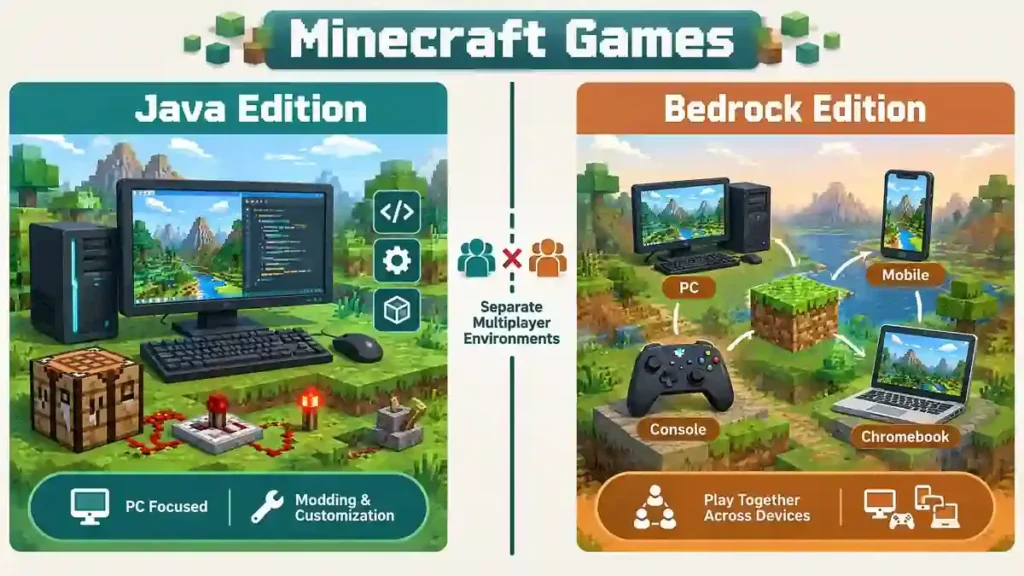
Java Edition mainly targets computers. You can play it on Windows, macOS, and Linux. It supports multiplayer servers made for Java players. Java also has a large modding community. Mods can add new features, items, worlds, and gameplay systems. However, mods can affect multiplayer compatibility between players. Java Edition also supports Realms. You can use Realms to play privately with other Java players. Minecraft Games
Minecraft Bedrock Edition
Bedrock Edition supports a wider range of devices. These include Windows, consoles, mobile devices, and supported Chromebooks. Bedrock focuses strongly on cross-platform multiplayer. Players on supported Bedrock devices can play together online. This makes Bedrock useful when friends use different types of devices. Bedrock also supports dedicated servers and Realms. However, Java and Bedrock servers use different systems. Minecraft Bedrock Edition
Can Java Players Play With Bedrock Players?
No. Java and Bedrock players cannot normally play together.
The two editions use separate multiplayer environments. A Java player needs a Java-compatible server or world. A Bedrock player needs a Bedrock-compatible option. Some unofficial tools can connect the two editions through special server setups. However, these setups can have limitations and compatibility issues. For normal online play, check your edition before joining friends. Minecraft’s official guidance also confirms the separation between Java and Bedrock multiplayer. Minecraft: Java or Bedrock Edition
Can You Play Minecraft Online for Free?
Minecraft is not simply a free browser game. The official game requires a purchase, depending on your platform and edition. However, Minecraft offers official free trials for some devices.
Is the Official Minecraft Game Free?
The official free trial lets you test the core Survival experience before buying Minecraft. Trial access has limits, including limited play time. Minecraft says trials provide about 100 minutes of in-game time. The free trial does not allow online multiplayer servers. However, LAN multiplayer is allowed during the trial. Minecraft also offers Realms trials for eligible users. These trials have separate terms and availability.
What Does “Minecraft Online Free” Usually Mean?
The phrase “Minecraft online free” can describe several different things.
Official Minecraft refers to the paid game from Mojang and Microsoft.
Minecraft free trial means the official limited trial version.
Browser-based Minecraft-style games use similar building or survival ideas.
Unofficial browser ports may try to recreate or run Minecraft online.
Minecraft-inspired games create similar experiences without being Minecraft.
These options are not the same. A website offering Minecraft in your browser does not automatically represent official Minecraft. Check the website and game source before downloading files or entering account details.
Can You Play Minecraft Online Without Downloading It?
If you search for “Minecraft online no download,” you may find several different types of websites. It is important to know which ones offer official Minecraft.
Official Minecraft
The official Minecraft game normally requires an application or launcher. Minecraft provides downloads for Java Edition and Bedrock Edition on supported devices. The official free trial also requires downloading Minecraft. It does not run as a browser-only version of the main game. One exception is Minecraft Classic, an older official version available through a web browser. Minecraft lists it as a free-to-play version. However, it is not the current Minecraft experience.
Browser-Based Alternatives
Some websites offer block-building games that run directly inside your browser. These games can resemble Minecraft and may require no download. You may also find unofficial browser implementations that attempt to recreate Minecraft. These are not automatically official Minecraft products. Minecraft-inspired games offer another option. They may use similar building, survival, or crafting ideas while remaining separate games. Always check the source before signing in or downloading anything. This helps you avoid confusing an unofficial browser game with official Minecraft.
How to Play Minecraft Online on Chromebook
You can play official Minecraft on supported Chromebook devices. Minecraft offers Bedrock Edition through Google Play on compatible Chromebooks.
Play Minecraft Online on Chromebook
Install Minecraft from the Google Play Store if your Chromebook supports it. You need a stable internet connection for online multiplayer. Minecraft also requires a Microsoft account for online features. Chromebook players can use Bedrock multiplayer, Realms, and cross-device play. Your friends must use compatible Bedrock versions for normal cross-platform multiplayer. Java Edition officially supports Windows, Mac, and Linux. Chromebook support listed by Minecraft applies to Bedrock Edition instead.
Can Chromebook Players Play With Friends?
Yes, but edition compatibility matters. A Chromebook using Bedrock can play with other Bedrock players on supported platforms. Java and Bedrock use separate multiplayer systems. Java players cannot normally join Bedrock worlds or servers. Check your edition before trying to join a friend’s world. This simple step can prevent many multiplayer connection problems.
Minecraft Online Servers
Minecraft servers are a major part of the game’s online community. They let multiple players share online worlds and experiences. Minecraft’s official server list features community-created worlds with different activities and play styles.
What Is a Minecraft Server?
A Minecraft server is an online world where multiple players can play together. Server owners can create their own rules, maps, gameplay systems, and communities. Some servers focus on survival, while others offer minigames or competitive gameplay. This variety gives players many ways to enjoy Minecraft online.
Types of Minecraft Servers
Common Minecraft server types include:
- Survival: Gather resources, build bases, and survive hostile mobs.
- Creative: Build freely with unlimited resources.
- Skyblock: Survive and expand a small floating island.
- PvP: Fight other players in competitive battles.
- Minigames: Play short games with specific objectives.
- Adventure: Explore custom worlds and complete challenges.
- Economy: Trade items, earn currency, and build virtual businesses.
- Anarchy: Play with very few rules or restrictions.
How to Join a Minecraft Server
First, open Minecraft and select the multiplayer or server option. Bedrock players can use the Servers tab for featured servers. Java and Bedrock players can also use Add Server for compatible servers.
Enter the server address when required. Then select the server and connect. Your Minecraft edition must match the server’s supported edition. Java players need Java servers, while Bedrock players need Bedrock-compatible servers. For more options, explore our Best Minecraft Servers, Minecraft Survival Servers, Minecraft PvP Servers, and Minecraft Server Commands guides.
Minecraft Realms vs Minecraft Servers
Minecraft Realms and Minecraft servers both support online multiplayer. However, they serve different types of players.
| Feature | Realms | Servers |
| Private world | Yes | Depends |
| Friends | Yes | Yes |
| Community | Limited/private | Often large |
| Setup | Easy | Varies |
| Customization | Limited | Often extensive |
| Mods | Edition-dependent | Server-dependent |
| Always online | Yes | Depends |
Minecraft Realms
Realms are official private servers hosted by Minecraft. You can invite friends and keep your world online. Friends can play even when you are offline. Minecraft Realms Realms are useful for small groups that want simple setup. You do not need to manage server hardware or complicated hosting settings.
Minecraft Servers
Servers can offer much larger communities and more varied gameplay. Minecraft describes them as community-created online worlds. They can include minigames, competitions, adventures, and other experiences. Minecraft Servers Server features depend on the server owner. Some offer custom systems, plugins, maps, economies, or competitive modes.
Choose Realms if you want a simple private world with friends.
Choose a server if you want larger communities or more customized gameplay.
Both options require compatible Minecraft editions for multiplayer connections. Minecraft Multiplayer Requirements
What Do You Need to Play Minecraft Online?
Before playing Minecraft online, check a few basic requirements. This simple checklist can prevent common multiplayer problems.
Minecraft Online Requirements
- Minecraft account: You need a Microsoft account for Minecraft multiplayer.
- Correct edition: Java players need Java multiplayer options. Bedrock players need Bedrock-compatible worlds or servers.
- Supported device: Your device must support the Minecraft edition you want to play.
- Internet connection: Online multiplayer needs a stable internet connection. LAN play uses a local network instead.
- Updated game: Use the latest Minecraft release to reduce connection and compatibility problems.
- Multiplayer permissions: Account settings must allow multiplayer access. Child accounts may need permission changes.
- Server or Realm access: Some servers require their address. Realms require an invitation from the Realm host.
- Console subscription: Some consoles require an active online multiplayer subscription.
Check these requirements before troubleshooting a multiplayer connection. They cover the most common setup issues.
Common Minecraft Online Problems
Minecraft multiplayer can sometimes fail because of settings, versions, or connection issues. Start with these basic checks.
Minecraft Multiplayer Is Not Working
First, check that everyone uses the same compatible edition. Java and Bedrock use separate multiplayer systems. (help.minecraft.net) Next, update Minecraft to a compatible version. Check your internet connection and restart the game if needed. Also check your account’s multiplayer settings. Account restrictions can prevent online multiplayer access. (help.minecraft.net)
Can’t Join a Friend’s Minecraft World
Check that both players use the same edition. Then confirm that both games support compatible versions. Make sure multiplayer settings allow online play. Check your Microsoft account and confirm that your friend sent the correct invitation. If the problem continues, restart Minecraft and reconnect to the internet.
Minecraft Server Won’t Connect
First, check the server address carefully. One incorrect character can prevent a connection. Then check whether the server is online. Confirm that your Minecraft edition and game version match the server. Finally, test your internet connection. If other online services also fail, your connection may cause the problem. These checks can solve many common Minecraft online connection issues before deeper troubleshooting.
Minecraft Online Safety Tips
Playing Minecraft online can be fun, but you should protect your account and personal information.
Stay Safe While Playing Online
Never share your Minecraft or Microsoft account password with another player. Avoid sharing your real name, address, phone number, school, or other private information. Use reputable Minecraft servers and check their community rules before playing. Leave servers that encourage unsafe behavior or suspicious downloads. Be careful with websites promising “free Minecraft” downloads. Some unofficial websites may offer modified files or misleading downloads. Official Minecraft sources are safer when downloading the game.
Never download unknown launchers, mods, or files from suspicious websites. Check the source before opening any downloaded file. Parents can also review multiplayer permissions and parental controls when appropriate. Minecraft provides account and multiplayer settings that can help manage online access. (help.minecraft.net) Remember, not every website using the Minecraft name is official. Always check the source before entering account details or downloading software.
Frequently Asked Questions About Minecraft Online
Can You Play Minecraft Online?
Yes. Minecraft supports online multiplayer through shared worlds, Realms, and multiplayer servers. Your edition and device determine which options you can use.
Can You Play Minecraft Online With Friends?
Yes. You can play with friends through multiplayer worlds, Realms, or compatible servers. Everyone needs compatible Minecraft editions.
Is Minecraft Online Free?
The official Minecraft game is not simply a free online browser game. Minecraft offers free trials for supported platforms, but trials have limitations. Free browser games may be unofficial or Minecraft-inspired.
Can You Play Minecraft Online Without Downloading It?
The current official Minecraft game normally requires an application or launcher. Minecraft Classic offers an official browser experience, but it is an older version. Other browser games may be unofficial alternatives. (Minecraft Free Trial)
Can Java and Bedrock Play Together?
No. Java and Bedrock use separate multiplayer systems. Java players normally need Java-compatible multiplayer options. Bedrock players need Bedrock-compatible worlds or servers. (Minecraft Multiplayer Requirements)
Can You Play Minecraft Online on Chromebook?
Yes, on supported Chromebook configurations. Minecraft supports Bedrock Edition on compatible Chromebooks. Your friends also need compatible multiplayer editions. (Minecraft on Chromebook)
What Is Minecraft Realms?
Minecraft Realms is an official private online service. It lets you maintain an online world and invite friends to play together. (Minecraft Realms)
Do You Need Internet to Play Minecraft Multiplayer?
Yes, online multiplayer requires an internet connection. LAN multiplayer uses a shared local network instead.
Can You Play Minecraft Online on Mobile?
Yes. Supported mobile devices use Bedrock Edition for Minecraft multiplayer. You can play with other compatible Bedrock players across supported platforms.
What Is the Difference Between Minecraft Realms and Servers?
Realms provide official private online worlds for invited players. Servers can support larger communities and offer more customized gameplay. Server features depend on the server owner. (Minecraft Servers)
Final Verdict: The Best Way to Play Minecraft Online
The best way to play Minecraft online depends on what you want from multiplayer. Choose Realms if you want a private world for friends with simple setup. Choose servers if you want larger communities, minigames, or customized experiences. Choose Bedrock Edition if cross-platform multiplayer matters most. It supports multiplayer across supported Bedrock devices. Choose Java Edition if you play on PC and want Java servers, mods, and Java-specific gameplay.
If you want Minecraft online without downloading, check the source carefully. Minecraft Classic provides an official browser option, while many other browser games are unofficial or Minecraft-inspired. Before joining, confirm your edition, game version, and multiplayer settings. Then choose a compatible Realm or server and start playing and Minecraft OptiFine.