
OptiFine for Fabric: Compatibility, OptiFabric, Installation and Best Alternatives
Can you use OptiFine with Fabric? Yes, but not as a native Fabric mod. Official OptiFine does not integrate directly with Fabric Loader. OptiFabric historically provided a compatibility layer between OptiFine and Fabric. However, compatibility depends on your Minecraft version and the exact mod versions. Modern Fabric players often choose native alternatives instead. Sodium improves rendering performance, while Iris adds shader support. Other Fabric mods can replace specific OptiFine features. These include connected textures, custom entity models, dynamic lights, and custom item textures.
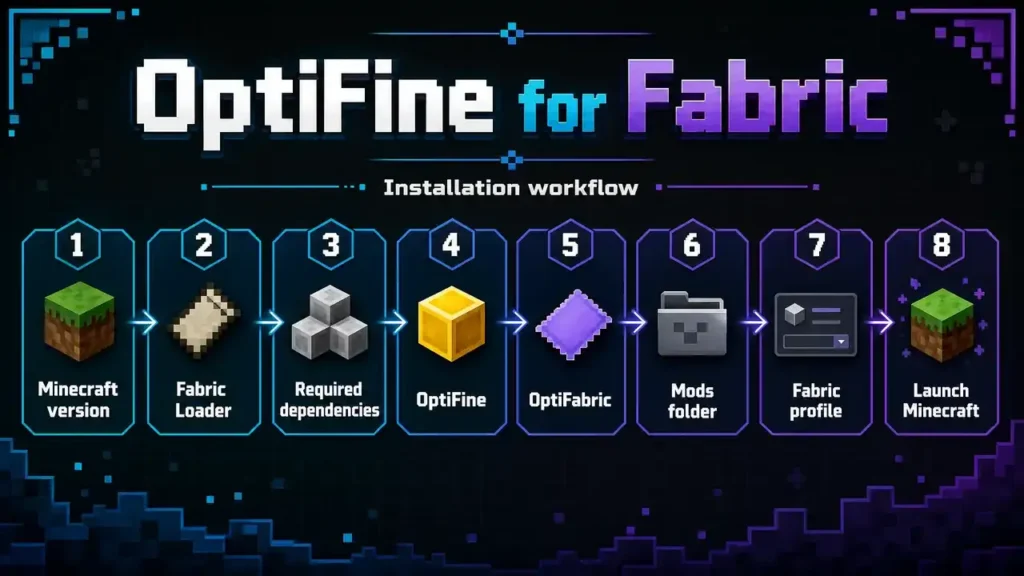
mThis guide explains OptiFine and Fabric compatibility in clear terms. You will also learn how OptiFabric works and where its limits appear. We cover installation, version matching, common errors, shaders, and resource packs. You will also find modern alternatives for different OptiFine features. This approach helps you choose the right setup for your Minecraft version. It also avoids confusing third-party Fabric projects with official OptiFine.
Quick Answer: Does OptiFine Work With Fabric?
Official OptiFine does not work as a native Fabric mod. Fabric acts as a mod loader, while OptiFine follows its own mod system. OptiFabric historically helped bridge these two systems. It allowed supported OptiFine builds to run with Fabric. However, OptiFabric is not an official part of OptiFine. Its compatibility also depends on your Minecraft version and mod versions.
For modern Fabric setups, native alternatives often provide a smoother experience. Sodium focuses on rendering performance and optimization. Iris works with Sodium to provide shader support. Other Fabric mods can replace individual OptiFine features.
| Setup | Purpose | Recommendation |
| OptiFine | Original optimization mod | Use with supported setup |
| OptiFine + OptiFabric | Fabric compatibility | Version-dependent |
| Sodium | Rendering performance | Strong modern choice |
| Sodium + Iris | Performance + shaders | Strong modern choice |
| Fabric alternatives | Individual feature replacements | Best for modular setups |
Always check exact version compatibility before installing an OptiFine and Fabric combination.
What Is OptiFine?
OptiFine is a Minecraft Java Edition optimization and graphics enhancement mod. It gives players more control over performance and visual settings. The project became popular because it combined many useful graphics features in one mod. OptiFine adds detailed Video Settings for controlling Minecraft’s rendering behavior. Players can adjust options such as render distance, graphics quality, animations, and performance settings. These controls can help players tune Minecraft for different hardware. OptiFine also supports shader packs, which can change lighting, shadows, reflections, and other visual effects. Its resource-pack features add support for connected textures and other advanced visuals. The mod also includes features such as Dynamic Lights and the well-known Zoom function.
OptiFine supports advanced resource-pack features involving custom entities and textures. These features helped make the mod popular among players who wanted more visual customization. The original OptiFine project comes from sp614x. It remains separate from Fabric and its third-party compatibility projects. OptiFabric is not official OptiFine. Likewise, Fabric modpacks that recreate OptiFine features are independent projects. This distinction matters when choosing mods, downloading files, and checking compatibility.
What Is Fabric?
Fabric is a lightweight modding platform for Minecraft Java Edition. It gives developers a flexible way to create and run Minecraft mods. Fabric Loader handles the basic process of loading compatible mods when Minecraft starts. Fabric API provides shared tools that many Fabric mods use. It helps developers build features without creating the same systems repeatedly. However, Fabric API and Fabric Loader serve different purposes. Fabric Loader loads mods into Minecraft. Fabric API provides common functions that many mods need. Neither one acts as an optimization mod by itself.
Fabric has a large ecosystem of performance and graphics mods. Developers can build focused mods that improve specific parts of Minecraft. Players can then combine these mods based on their needs. For example, Sodium targets rendering performance. Lithium improves game logic. Iris adds shader support to Fabric setups. Other mods replace individual OptiFine features. This modular approach makes Fabric different from OptiFine. OptiFine combines many optimization and visual features in one project. Fabric provides the platform where separate mods can work together. That difference becomes important when choosing an OptiFine for Fabric setup.
OptiFine vs OptiFabric vs OptiFine for Fabric
The names OptiFine, OptiFabric, and OptiFine for Fabric can cause confusion. They describe different projects with different purposes. Understanding this difference helps you avoid compatibility problems and misleading downloads.
Official OptiFine
OptiFine is the original Minecraft Java Edition optimization and visual enhancement mod. It adds performance controls, shaders, dynamic lights, zoom, and advanced resource-pack features. The project comes from sp614x. Official OptiFine is separate from the Fabric modding platform.
OptiFabric
OptiFabric is a third-party compatibility mod. It historically allowed supported OptiFine versions to run with Fabric. It does not replace OptiFine or become part of the official OptiFine project. Its compatibility depends on specific Minecraft, Fabric, OptiFine, and OptiFabric versions. You should always verify those versions before installation.
OptiFine for Fabric
OptiFine for Fabric can describe third-party projects or modpacks. These projects usually recreate OptiFine-style features with Fabric-native mods. They are not official OptiFine releases.
| Name | What it is | Official OptiFine? | Fabric-based? |
| OptiFine | Minecraft optimization mod | Yes | No |
| OptiFabric | Compatibility mod | No | Yes |
| OptiFine for Fabric | Third-party project or modpack | No | Yes |
This distinction matters when choosing downloads and checking compatibility. It also helps you avoid treating a third-party project as an official OptiFine release.
OptiFine Fabric Compatibility by Minecraft Version
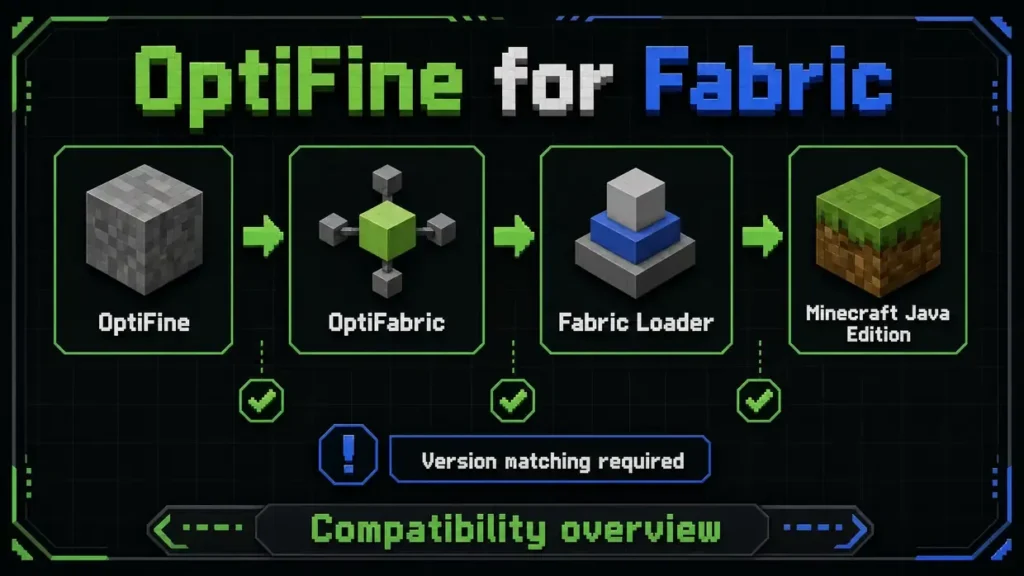
Minecraft version matching is critical when you combine OptiFine with Fabric. Each component must support the same Minecraft release. This includes OptiFine, OptiFabric, Fabric Loader, and other required mods. OptiFabric does not make every OptiFine release compatible with every Fabric version. Its latest listed release supports Minecraft 1.20.4. CurseForge lists that release as version 1.14.3, published on January 12, 2024. This means you should not assume OptiFabric supports Minecraft 1.21 or newer versions. A GitHub request from August 2025 specifically asked for 1.21+ support. A later comment stated that the project was no longer maintained.
| Minecraft Version | OptiFine + Fabric Situation | Recommended Approach |
| Older supported versions | May work through OptiFabric | Check exact versions |
| 1.20.x | Historical OptiFabric support varies | Verify project files |
| 1.21.x | Do not assume OptiFabric support | Prefer modern Fabric alternatives |
| Newer versions | Compatibility may change | Check current releases |
Always check the project’s current files before installing. Avoid forcing an old compatibility mod onto a newer Minecraft version. For modern Fabric releases, native alternatives such as Sodium and Iris can provide a more suitable setup.
Source: OptiFabric on CurseForge · OptiFabric GitHub issue for 1.21+ support
Can You Install OptiFine on Fabric?
You can run OptiFine with Fabric in some supported setups, but OptiFine is not a native Fabric mod. OptiFabric historically provided the compatibility layer needed for this combination. However, that setup depends on matching Minecraft, OptiFine, OptiFabric, and Fabric Loader versions. Version compatibility should come before installation. An OptiFabric release made for an older Minecraft version may fail on a newer release. It can also cause crashes or missing features. Be careful with files labeled “OptiFine Fabric.” That name can describe third-party projects, modpacks, or unofficial downloads. It does not automatically mean the file comes from the official OptiFine project.
Before installing anything, verify these details:
- Project source: Confirm the project’s official page.
- Minecraft version: Match the exact game version.
- Fabric Loader: Use the required loader version.
- Dependencies: Check every required dependency.
- Release date: Avoid outdated compatibility files.
- File name: Compare it with the project’s official release listing.
Avoid random download mirrors and modified .jar files. They can create security and compatibility risks. For newer Fabric versions, consider native alternatives such as Sodium and Iris. They often provide a cleaner path than forcing an older OptiFine compatibility setup.
How to Install OptiFine on Fabric With OptiFabric
Installing OptiFine with Fabric requires careful version matching. OptiFabric only works with supported combinations of Minecraft, Fabric, and OptiFine.
1. Install the Correct Minecraft Version
Start with the exact Minecraft Java Edition version supported by your chosen OptiFabric release. Do not begin with the newest version automatically.
2. Install Fabric Loader
Install the Fabric Loader version required for that Minecraft release. Create or select the matching Fabric profile in your launcher.
3. Check Required Dependencies
Review the OptiFabric release information for required dependencies. Install only files that the project’s documentation identifies.
4. Get Compatible OptiFine and OptiFabric Files
Download OptiFine and OptiFabric from their recognized project sources. Check the Minecraft version and release information before downloading.
5. Add the Mod Files
Open your Minecraft mods folder. Place the compatible .jar files inside it. Keep unrelated mods outside the folder during your first test.
6. Launch the Fabric Profile
Start Minecraft using the Fabric profile. Let the game complete its normal loading process.
7. Check the Title Screen
Confirm that Minecraft starts without a crash. Then open Video Settings and check for OptiFine-specific options.
8. Test Graphics Features
Test your resource packs first. If the setup supports shaders, test one shader pack afterward.
9. Test One Change at a Time
Add other Fabric mods only after the basic setup works. This makes future conflicts easier to identify.
Important: Never mix random OptiFine, OptiFabric, or Fabric versions. One incompatible file can prevent Minecraft from launching. Always verify the exact versions before installation.
Why OptiFabric May Not Work
OptiFabric can fail when one part of the setup does not match. Most problems come from version conflicts or unsupported combinations. Start with the basics before changing several files at once.
Common Causes
Wrong Minecraft version: Your OptiFabric release may target a different Minecraft version.
Wrong Fabric Loader: The installed Loader version may not match your mod setup.
Wrong OptiFabric version: An outdated OptiFabric build may not support your Minecraft release.
Unsupported OptiFine build: OptiFabric needs a compatible OptiFine version. A newer OptiFine file may not solve an older compatibility problem.
Missing dependency: Some setups require additional Fabric components. Check the project’s release information carefully.
Conflicting mods: Another mod can interfere with OptiFine or OptiFabric during startup.
Shader incompatibility: A shader pack can cause crashes or rendering problems. Test Minecraft without shaders first.
Resource-pack incompatibility: Some packs depend on OptiFine-specific features. Missing those features can cause visual errors.
Old compatibility layer: Older OptiFabric builds cannot automatically support newer Minecraft releases.
Use This Diagnostic Sequence
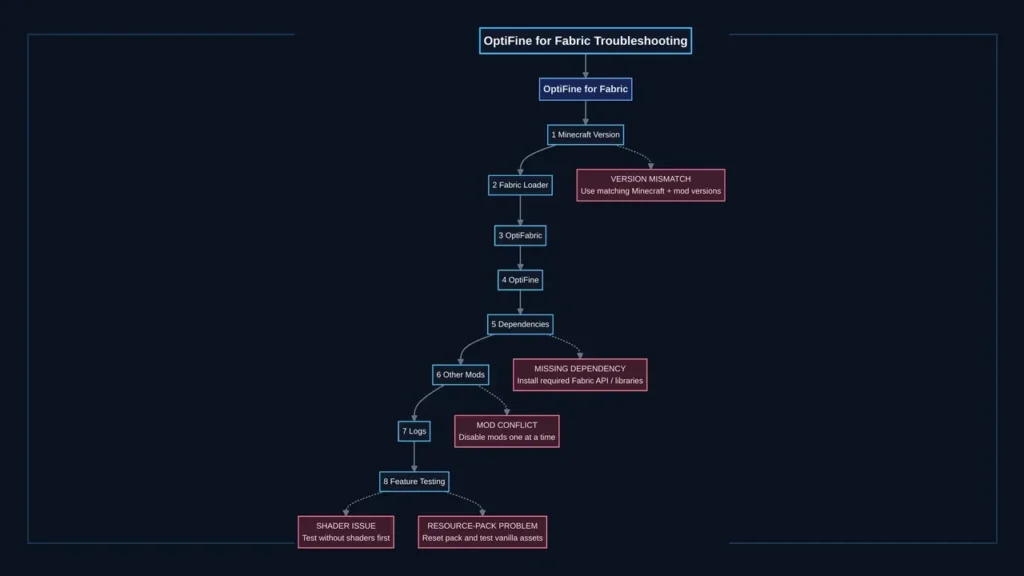
Version → Loader → Dependencies → Mods → Logs → Feature test
First, verify every Minecraft and mod version. Next, check Fabric Loader and required dependencies. Then remove other mods and launch again. If Minecraft still crashes, inspect the latest log for the failing component. Finally, test individual features such as resource packs or shaders. This method isolates problems instead of changing everything at once. It also makes future troubleshooting much easier.
Best Modern Alternative: Sodium
Sodium is one of the strongest modern alternatives to OptiFine for Fabric. It focuses on Minecraft’s rendering system and aims to improve performance. Sodium works as a native Fabric mod, so it fits naturally into Fabric-based setups. Sodium can take over much of OptiFine’s performance role. It provides rendering optimizations and useful video settings for tuning Minecraft. However, performance gains vary between systems. Your CPU, GPU, memory, render distance, resolution, and other mods can affect results. Avoid claims that promise a fixed FPS increase. Sodium also does not replace every OptiFine feature by itself. It mainly targets rendering performance. Features such as shaders, connected textures, custom entity models, and dynamic lights need other solutions.
For shaders, Iris works with Sodium to provide a Fabric-based shader system. Continuity can replace connected texture features in supported setups. Entity Model Features can provide custom entity model support. Other Fabric mods can handle additional OptiFine-style features. This modular approach gives you more control over your Minecraft installation. You can install only the features you actually need. For a new Fabric setup, Sodium provides a strong starting point. Add other mods based on your resource packs, shaders, and visual preferences. This approach also avoids forcing an older OptiFabric setup onto an unsupported Minecraft version.
Sodium + Iris: OptiFine-Style Shaders on Fabric
Sodium + Iris offers a popular way to use shaders on Fabric. Sodium handles Minecraft’s rendering performance, while Iris Shaders provides the shader-loading system. Together, they create a strong OptiFine shaders alternative for modern Fabric setups. Iris supports many shader packs created for the wider Minecraft shader ecosystem. However, compatibility can vary between individual shader packs. Always check the shader author’s supported Minecraft versions and loader requirements. The Sodium Iris Fabric combination also keeps the setup modular. You can update rendering and shader components separately when compatible releases become available. This differs from OptiFine, which combines many visual features inside one mod.
Shader performance depends on several factors. Your GPU has a major impact on rendering demanding effects. Shader settings can also change performance significantly. Render distance, screen resolution, resource packs, and other mods affect the workload too. Start with moderate shader settings before increasing visual quality. Lower shadow quality, volumetric effects, and render distance when performance drops. Test one shader pack at a time to identify compatibility problems. If you want Shaders Fabric support without relying on OptiFabric, Sodium and Iris provide a practical path. Iris focuses on shaders, while Sodium handles rendering optimization. Other Fabric mods can then replace additional OptiFine features when needed.
Replacing OptiFine Features on Fabric
One reason Fabric attracts experienced Minecraft players is its modular design. You do not need one large mod for every graphics feature. Instead, you can choose separate mods for specific needs.
| OptiFine Feature | Fabric Alternative |
| Performance | Sodium |
| Shaders | Iris |
| Game logic optimization | Lithium |
| Memory optimization | FerriteCore |
| Connected Textures | Continuity |
| Custom Entity Models | Entity Model Features |
| Entity Textures | Entity Texture Features |
| Custom Item Textures | CIT Resewn |
| Dynamic Lights | LambDynamicLights |
| Entity Culling | Entity Culling |
| Zoom | Ok Zoomer or similar |
| Better Grass | LambdaBetterGrass |
| Extra Sodium settings | Sodium Extra or Reese’s Sodium Options |
Sodium focuses on rendering performance. Iris adds shader support for Fabric. Lithium targets game logic and can improve server-side and client-side efficiency. FerriteCore focuses on reducing memory usage. For visual features, Continuity supports connected textures in compatible resource packs. Entity Model Features adds Custom Entity Models support. Entity Texture Features handles features such as random and emissive entity textures. CIT Resewn provides Custom Item Texture support. LambDynamicLights can provide dynamic lighting without OptiFine. Entity Culling can reduce rendering work for hidden objects. Zoom mods can replace OptiFine’s familiar zoom function.
The main advantage is flexibility. You can install only the features your setup needs. A player who wants shaders can use Sodium and Iris. Another player can add Continuity for connected textures. This modular approach also makes troubleshooting easier. You can identify which mod controls a specific feature. However, individual mods can have their own dependencies and compatibility limits. Always check their current documentation before installation.
OptiFine Resource Packs on Fabric
Some Minecraft resource packs rely on features that OptiFine adds. These packs can include connected textures, custom items, random entities, and special entity models. They may not work correctly when you move from OptiFine to Fabric. Continuity can provide connected texture support for compatible resource packs. It can help recreate the seamless glass and similar visual effects that players often associate with OptiFine. CIT Resewn provides support for Custom Item Textures. It can help resource packs that use custom item models or textures. However, compatibility depends on the pack’s structure and supported features.
Entity Texture Features (ETF) supports advanced entity texture features. These can include random and emissive textures. Entity Model Features (EMF) adds support for Custom Entity Models and works alongside ETF for certain resource packs.
These mods can cover many common OptiFine resource-pack features. However, they do not guarantee perfect one-to-one compatibility. A resource pack may depend on several OptiFine features at once. Before switching, check the resource pack’s documentation. Look for Fabric support and required mods. Install those dependencies before testing the pack. If a pack looks broken, test it without shaders first. Then check connected textures, custom items, and entity features separately. This makes compatibility problems easier to identify. A Fabric setup can support many advanced resource packs. You simply need the correct feature replacements for each pack.
OptiFine Shaders vs Iris on Fabric
Yes, you can use many OptiFine shader packs on Fabric with Iris. Iris provides a shader-loading system designed for modern Fabric setups. It commonly works alongside Sodium for rendering performance. However, shader compatibility is not universal. Some packs rely on OptiFine-specific features or unsupported effects. Always check the shader developer’s compatibility notes before switching platforms. The Sodium + Iris stack separates rendering from shader support. Sodium handles the rendering side, while Iris loads compatible shader packs. This gives Fabric players a modular alternative to OptiFine’s integrated approach. Shader performance depends heavily on your hardware and settings. GPU power, resolution, render distance, shader quality, and visual effects can change performance significantly. Start with moderate settings and increase them gradually.
Common shader problems include crashes, missing effects, visual glitches, and poor performance. First, launch Minecraft without shaders to confirm the base setup works. Then test one shader pack at a time. If a shader fails, check its supported Minecraft version and Iris requirements. Also update compatible dependencies before changing multiple settings. For many players, Iris Shaders provides a practical way to continue using familiar shader packs on Fabric. It does not guarantee perfect compatibility with every OptiFine shader feature.
Best Fabric Mod Setup for OptiFine-Like Features
A good Fabric setup can replace many OptiFine features with focused mods. Start with a small group of trusted mods. Then add features based on your needs.
Core Performance
Use Fabric Loader as the mod-loading platform. Add Fabric API when your selected mods require it. Sodium handles rendering performance. Lithium targets game logic optimization. FerriteCore focuses on memory usage.
Graphics
Add Iris if you want shader support. Continuity can provide connected textures for compatible resource packs. Entity Model Features (EMF) adds Custom Entity Models support. Entity Texture Features (ETF) handles advanced entity texture features.
Quality of Life
Add a dynamic-lighting mod when you want portable light sources. A compatible zoom mod can recreate OptiFine’s zoom feature. Entity Culling can reduce unnecessary rendering work. Sodium Extra adds additional Sodium-related settings. Reese’s Sodium Options provides an alternative settings interface.
| Category | Recommended Mods |
| Performance | Sodium, Lithium, FerriteCore |
| Shaders | Iris |
| Textures | Continuity |
| Entity models | EMF |
| Entity textures | ETF |
| Dynamic lights | Compatible dynamic-light mod |
| Zoom | Compatible zoom mod |
| Rendering | Entity Culling |
| Extra settings | Sodium Extra, Reese’s Sodium Options |
Do not install everything at once. Start with Fabric Loader, required dependencies, Sodium, and your essential features. Test Minecraft after each addition. This gradual approach makes troubleshooting much easier. If Minecraft crashes, you can quickly identify the latest change. It also prevents unnecessary mods from increasing configuration complexity.
OptiFine for Fabric vs OptiFine
OptiFine and a Fabric alternative stack take different approaches. OptiFine combines many graphics and optimization features in one major mod. Fabric lets you build a similar setup from separate mods.
| Category | OptiFine | Fabric Alternative Stack |
| Installation | Single major mod | Multiple mods |
| Performance | Integrated | Modular |
| Shaders | Built in | Iris |
| Connected Textures | Built in | Continuity |
| CEM | Built in | EMF |
| Dynamic Lights | Built in | Separate mod |
| Customization | Integrated | Highly modular |
| Fabric ecosystem | Separate from Fabric | Native |
OptiFine can feel simpler because many features come from one project. You manage fewer individual mods and dependencies. A Fabric stack takes more setup. However, it gives you more control over individual features. You can choose Sodium for rendering, Iris for shaders, or Continuity for connected textures. Updates also follow different paths. OptiFine releases must match supported Minecraft versions. Fabric users can update individual mods when compatible releases become available.
Neither approach suits every player. OptiFine makes sense for users who want its integrated feature set and supported versions. A Fabric alternative stack suits players who want modular performance and broader Fabric ecosystem integration. Your Minecraft version, resource packs, shaders, and preferred features should guide the final choice.
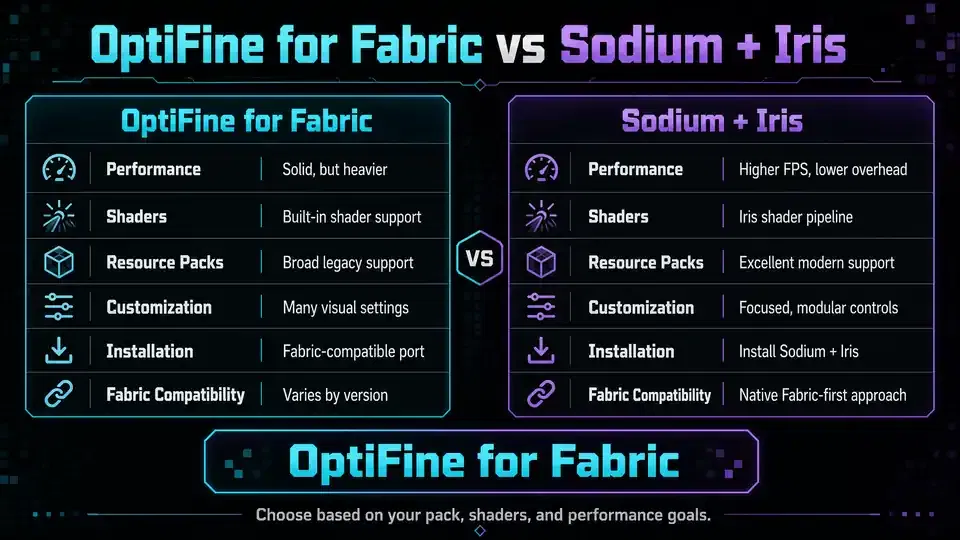
OptiFine for Fabric vs Sodium + Iris
OptiFine for Fabric and Sodium + Iris solve similar needs through different approaches. OptiFine combines many features, while Fabric separates them into focused mods.
| Category | OptiFine for Fabric | Sodium + Iris |
| Performance | Depends on the project and setup | Focuses on rendering performance |
| Shaders | Depends on included components | Iris provides shader support |
| Resource packs | Depends on supported features | Requires additional feature mods |
| Mod compatibility | Varies by project | Designed for the Fabric ecosystem |
| Configuration | Can vary between projects | Separate settings for each mod |
| Feature coverage | May bundle many features | Add features as needed |
| Installation | Depends on the project | Requires compatible Fabric mods |
| Maintenance | Depends on project updates | Follow individual mod releases |
Performance does not have one universal winner. Results depend on your hardware, Minecraft version, settings, shaders, and installed mods. Sodium focuses specifically on rendering optimization, while Iris handles shader loading. Resource-pack support also differs. Some OptiFine packs need additional Fabric mods for connected textures, custom items, or entity features. Sodium and Iris do not automatically replace every OptiFine feature. Sodium + Iris can provide a cleaner path for players already using Fabric. You can add only the features your resource packs or gameplay require.
OptiFine can remain useful for players who prefer its integrated feature set. The better choice depends on your Minecraft version, required features, and preferred mod ecosystem. Always check current compatibility before building either setup.
Best OptiFine Alternatives for Fabric
Fabric offers several focused mods that can replace individual OptiFine features. You can build a setup around the features you actually need.
- Sodium — Improves Minecraft’s rendering performance and provides a strong OptiFine performance alternative.
- Iris — Adds shader support and works with Sodium in Fabric setups.
- Lithium — Optimizes parts of Minecraft’s game logic.
- FerriteCore — Targets memory usage and can reduce unnecessary memory consumption.
- Continuity — Adds connected texture support for compatible resource packs.
- Entity Model Features (EMF) — Recreates Custom Entity Models support for compatible packs.
- Entity Texture Features (ETF) — Adds advanced entity texture features, including random and emissive textures.
- CIT Resewn — Provides Custom Item Texture support for compatible resource packs.
- LambDynamicLights — Adds dynamic lighting features to Fabric.
- Entity Culling — Reduces rendering work for certain hidden objects.
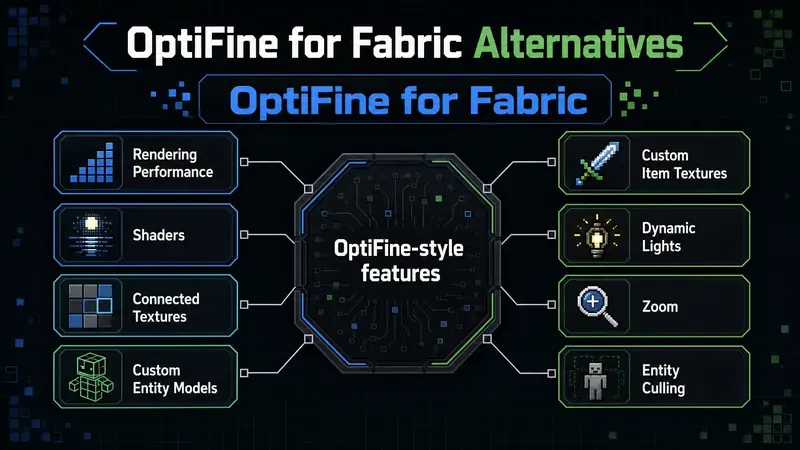
The best alternative depends on the OptiFine feature you want to replace. Sodium suits players focused on rendering performance. Iris fits players who mainly want shaders. Resource-pack users may need several visual mods together. This modular approach is one of Fabric’s biggest advantages. You can combine performance, graphics, and resource-pack features without installing every available mod. Always check each project’s supported Minecraft version and dependencies. Compatibility can change between releases.
Best OptiFine-Like Fabric Modpacks
Fabric modpacks can recreate many features that players associate with OptiFine. These packs combine several Fabric-native mods into one tested collection. However, they are not official OptiFine releases. OptiFine remains the original optimization mod created by sp614x. Projects using names such as OptiFine for Fabric are separate third-party projects or modpacks.
Popular Fabric Collections
OptiFine for Fabric projects can bundle Fabric mods that replace OptiFine-style features. Their exact contents and supported Minecraft versions can vary. Always check the project’s current documentation. Additive focuses on improving Minecraft’s performance while adding useful visual and quality-of-life features. It uses Fabric-native mods rather than turning OptiFine into a Fabric mod. Fabulously Optimized is another well-known Fabric modpack focused on performance and visual improvements. It combines multiple optimization mods into a maintained collection. Other Fabric collections can provide similar goals. Their mod lists, update schedules, and compatibility can differ.
| Project Type | Official OptiFine? | Fabric-Based? |
| Official OptiFine | Yes | No |
| OptiFine for Fabric projects | No | Yes |
| Additive | No | Yes |
| Fabulously Optimized | No | Yes |
| Other Fabric collections | No | Usually |
Always verify the project name and publisher before downloading. A third-party modpack should never be presented as an official OptiFine release. This distinction protects readers from confusion and helps them choose the right setup for their Minecraft version.
OptiFine for Fabric Troubleshooting
Troubleshooting an OptiFine for Fabric setup starts with version checks. Most problems involve incompatible mods, missing dependencies, or unsupported features. Follow one diagnostic step at a time.
Fabric crashes after installing OptiFabric
Check your Minecraft version first. Then verify your Fabric Loader, OptiFine, and OptiFabric versions. Every component must support the same Minecraft release. Remove other mods during the first test.
OptiFine does not appear
Confirm that you launched the correct Fabric profile. Check that the .jar files sit inside the correct Minecraft mods folder. Also verify that your OptiFine and OptiFabric versions match.
Minecraft crashes with shaders
Disable shaders and launch Minecraft again. If the game works, test one shader pack at a time. Check the shader developer’s compatibility information before changing other settings.
Resource pack features are missing
Some packs depend on OptiFine-specific features. Check whether the pack requires CTM, CIT, EMF, or ETF support. Install the appropriate Fabric alternatives when available.
FPS is worse
Do not add several optimization mods at once. Test your baseline performance first. Then add one mod and test again. Hardware, render distance, shaders, and resource packs can also affect performance.
Mods conflict
Remove recently added mods and launch Minecraft again. If the crash disappears, add mods back individually. This process helps identify the conflicting component.
Game crashes before reaching the menu
Check the latest Minecraft log for errors. Look for missing dependencies, incompatible versions, or specific mod names. Verify every dependency against its current project documentation.
OptiFabric does not support my Minecraft version
Do not force an old compatibility layer onto a newer Minecraft release. Unsupported combinations can cause crashes or broken features. Instead, consider a native Fabric stack with Sodium, Iris, and other feature-specific alternatives.
A simple diagnostic order works best:
Version → Loader → Dependencies → Mods → Logs → Feature test
This approach reduces guesswork and makes compatibility problems easier to isolate.
Safety: How to Download Fabric Mods
Downloading Fabric mods from trusted sources helps protect your Minecraft installation. It also reduces compatibility problems caused by modified or outdated files. Start with the official project page whenever possible. Check the developer or organization name before downloading. Use trusted platforms such as Modrinth, CurseForge, official Fabric documentation, and the project’s official GitHub repository. Always match the mod with your exact Minecraft version. Then check the required Fabric Loader version and dependencies. A correct project file can still fail when its dependencies do not match.
Avoid suspicious installers, modified launchers, and unofficial “patched” .jar files. Be especially careful with files claiming to provide unsupported OptiFine and Fabric combinations. Check the file name against the project’s official release listing. Review the release date and supported versions before installation. When appropriate, scan downloaded files with your security software. Keep a backup of important Minecraft worlds before adding new mods. Test unfamiliar mods with a separate profile when possible. Remember that OptiFine, OptiFabric, and Fabric alternatives are separate projects. A download page using the OptiFine name does not automatically represent official OptiFine. Trusted sources and careful version checks provide a safer path for building your Fabric setup.
Who Should Use OptiFine With Fabric?
OptiFine with Fabric makes sense for players with a supported legacy setup. It can also suit users who need a specific OptiFine feature. Players maintaining an existing OptiFine-based configuration may prefer keeping their current setup. However, a different approach often works better for new Fabric installations. Modern Minecraft versions can have limited compatibility with older OptiFabric releases. For these users, native Fabric alternatives can provide a simpler path. Players focused on modular performance can start with Sodium and add other optimization mods as needed.
Users who want shaders can pair Sodium with Iris. Resource-pack features can receive separate replacements through mods such as Continuity, EMF, ETF, and CIT Resewn. Choose your setup based on your Minecraft version and required features. Do not choose OptiFabric simply because its name includes OptiFine. For most new Fabric installations, a native Fabric mod stack offers greater flexibility. Existing users with a compatible OptiFine setup may have different priorities.
Pros and Cons
Using OptiFine with Fabric can make sense for specific Minecraft setups. However, it also introduces compatibility considerations that you should understand first.
Pros
- Familiar features: Players can keep familiar OptiFine graphics and optimization options.
- Resource-pack support: Existing packs may work when their required OptiFine features remain supported.
- Established controls: OptiFine provides detailed graphics and performance settings.
- Useful for supported setups: Compatible versions can serve players maintaining older configurations.
Cons
- Compatibility complexity: OptiFine, OptiFabric, Fabric Loader, and Minecraft versions must match.
- Version restrictions: An older OptiFabric release may not support newer Minecraft versions.
- Extra dependency: The setup requires OptiFabric for the compatibility layer.
- Mod conflicts: Other Fabric mods can create crashes or feature conflicts.
- Modern alternatives: Native Fabric mods can provide a cleaner and more modular experience.
Overall, OptiFine with Fabric works best when your exact versions support the combination. New Fabric users may find Sodium, Iris, and other focused mods easier to maintain.
Frequently Asked Questions
Is OptiFine compatible with Fabric?
OptiFine does not natively support Fabric. OptiFabric historically provided compatibility between supported OptiFine and Fabric versions. Compatibility depends on the exact Minecraft and mod versions.
Can I use OptiFine on Fabric 1.21?
Do not assume OptiFabric supports Minecraft 1.21. Its latest listed CurseForge release supports Minecraft 1.20.4. Check current project information before attempting installation. Native Fabric alternatives may provide a better option.
What is OptiFabric?
OptiFabric is a third-party compatibility mod. It historically allowed supported OptiFine releases to run with Fabric. It is separate from the official OptiFine project.
Is OptiFabric official OptiFine?
No. OptiFabric is not an official OptiFine project. Chocohead developed OptiFabric as a compatibility layer for Fabric users.
Is OptiFabric still maintained?
Current project information should determine its maintenance status. Its latest CurseForge release dates to January 2024 and supports Minecraft 1.20.4. Check the project’s current repository before relying on it.
Can I use OptiFine shaders with Fabric?
Yes, many OptiFine shader packs work through Iris on Fabric. Compatibility varies by shader pack. Check the shader developer’s requirements before installation.
Is Sodium better than OptiFine for Fabric?
Sodium provides a strong native Fabric option for rendering performance. However, there is no universal winner. Results depend on hardware, Minecraft version, settings, and other mods.
Can Iris replace OptiFine shaders?
Yes. Iris provides shader loading for Fabric and works with Sodium. It supports many shader packs from the Minecraft shader ecosystem.
What replaces OptiFine’s connected textures on Fabric?
Continuity can provide connected texture support for compatible resource packs. Not every OptiFine texture feature has perfect one-to-one compatibility.
What replaces OptiFine CEM on Fabric?
Entity Model Features (EMF) provides Custom Entity Models support for compatible resource packs. Check the pack’s requirements before installation.
What replaces OptiFine CIT on Fabric?
CIT Resewn provides Custom Item Texture support on Fabric. Compatibility depends on the resource pack and its specific features.
What is the best OptiFine alternative for Fabric?
Sodium is a strong choice for rendering performance. Iris adds shaders, while other Fabric mods replace specific OptiFine features. Your needs should determine the final combination.
Can Fabric mods improve FPS?
Yes, some Fabric mods optimize rendering, game logic, memory use, or other systems. Actual performance varies by hardware, Minecraft version, settings, and installed mods.
Is OptiFine for Fabric an official OptiFine project?
No. OptiFine for Fabric can refer to third-party projects or modpacks. These projects use Fabric-native mods to recreate OptiFine-style features. They should not be confused with official OptiFine.
Conclusion
OptiFine and Fabric belong to different modding ecosystems. OptiFabric historically bridged the gap between them for supported versions. However, compatibility depends on your exact Minecraft, OptiFine, OptiFabric, and Fabric Loader versions. For a new Fabric installation, native alternatives often provide a cleaner solution. Sodium + Iris offers a strong starting point for performance and shaders. You can then add focused mods for connected textures, custom entity models, dynamic lights, and other features.
Players with an existing OptiFine setup may still prefer OptiFine when their versions support the required configuration. This can also make sense when a resource pack depends heavily on OptiFine features. The key is to choose based on your Minecraft version and actual requirements. Do not force an outdated compatibility layer onto a newer release. For most modern Fabric users, a modular setup provides greater flexibility. For supported legacy configurations, OptiFine can still remain useful. The best OptiFine for Fabric setup is the one that matches your version, features, and mod requirements.