
Where to Put OptiFine in Minecraft Folder
Many players ask where to put OptiFine in the Minecraft folder. The answer depends on how you install OptiFine. If you use the OptiFine Installer, you do not move the file into any Minecraft folder. Run the installer, and it installs OptiFine in the correct location automatically. If you use Forge, place the OptiFine .jar file inside the mods folder. Forge loads OptiFine like any other mod. If you use CurseForge, copy the OptiFine .jar file into the mods folder of your selected CurseForge profile. Many installation problems happen because players choose the wrong folder. Some place OptiFine in shaderpacks, resourcepacks, or versions by mistake. These locations will not install or load OptiFine correctly.
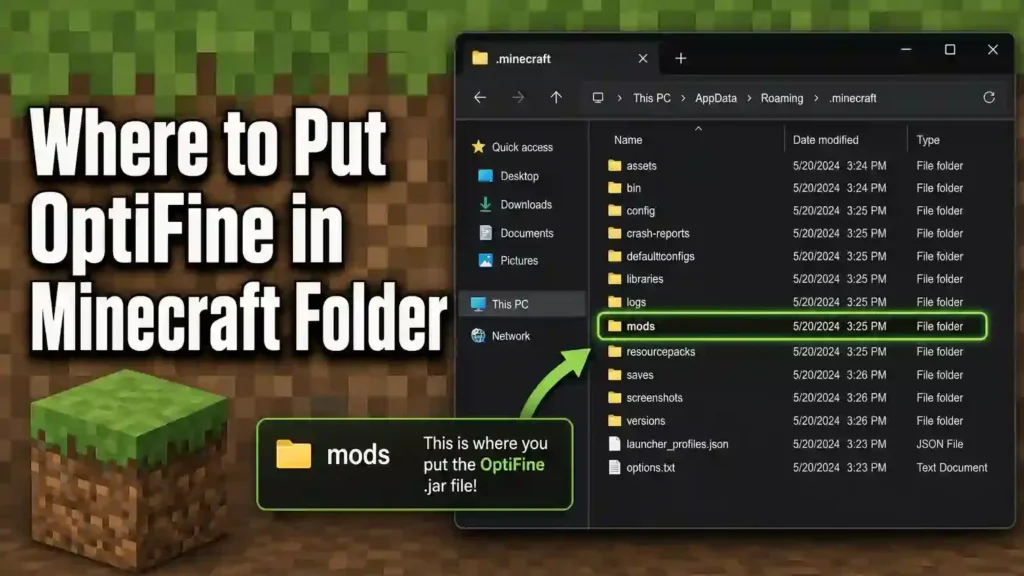
This guide explains the correct folder for every installation method. It also shows where to find the Where to Put OptiFine in Minecraft Folder, avoid common mistakes, and verify that OptiFine works after installation. For the most accurate installation steps, always download OptiFine from the official OptiFine website and follow the official Minecraft launcher guidance when selecting your game version and How to Use OptiFine in Minecraft.
Quick Answer: Where Should OptiFine Go?
The correct OptiFine location depends on your installation method. Most players should not move OptiFine files manually.
| Installation Method | Where to Put OptiFine | Notes |
| Standalone (OptiFine Installer) | Do not place it in any folder manually. Run the OptiFine .jar installer. | The installer creates a new OptiFine version inside the .minecraft/versions folder automatically. |
| Forge | Place the OptiFine .jar file inside the .minecraft/mods folder. | Forge loads OptiFine as a regular mod during startup. |
| CurseForge | Copy the OptiFine .jar file into your CurseForge profile’s mods folder. | Each CurseForge profile uses its own game directory and mods folder. |
| Fabric | Do not place OptiFine directly in the mods folder unless you use OptiFabric. | Many players choose Iris and Sodium instead because they work better with Fabric. |
| Custom Minecraft Directory | Use the mods folder or installer path inside your custom game directory. | Always install OptiFine in the folder linked to your selected Minecraft profile. |
The safest method is the OptiFine Installer. It detects your Minecraft folder and installs the required files automatically.
If you use Forge or CurseForge, place the OptiFine .jar file only inside the correct mods folder. Avoid shaderpacks, resourcepacks, or other Minecraft folders because OptiFine will not load from them.
What Is the Minecraft Folder?
The .Where to Put OptiFine in Minecraft Folder is the main directory for Minecraft: Java Edition. It stores your game files, settings, worlds, and installed content. OptiFine also uses this folder during installation. Most OptiFine files install or load from folders inside .minecraft. Understanding its structure helps you avoid installation mistakes.
What Is the .minecraft Folder?
The .minecraft folder keeps everything Minecraft needs to run.
It stores:
- Game files that launch Minecraft.
- World saves you create and play.
- Resource packs that change textures and sounds.
- Version files for different Minecraft releases.
- Mods installed through a mod loader like Forge.
- Shader packs used with OptiFine for enhanced graphics.
- Settings and configuration files for Minecraft and mods.
The OptiFine Installer detects this folder automatically in most cases. If you use Forge or a custom profile, you may need to open the correct game directory yourself.
Minecraft Folder Structure
Each folder inside .minecraft serves a specific purpose.
mods
The mods folder stores Minecraft mods. Place the OptiFine .jar file here when using Forge or a compatible mod loader.
versions
The versions folder contains every installed Minecraft version. The OptiFine Installer creates a new OptiFine version here automatically.
shaderpacks
The shaderpacks folder stores shader pack .zip files. Do not place the OptiFine .jar file here.
resourcepacks
The resourcepacks folder stores custom textures, sounds, and fonts. It does not load OptiFine.
saves
The saves folder contains your Minecraft worlds. Each world has its own folder and game data.
config
The config folder stores settings for Forge and installed mods. It helps mods remember your preferences.
logs
The logs folder records startup messages and errors. It helps identify installation and compatibility problems when Minecraft fails to load.
Where to Put OptiFine in Minecraft Folder
The correct OptiFine folder depends on your installation method. Follow the instructions below to install OptiFine without errors.
Method 1 — Use the OptiFine Installer
This method works best if you play Minecraft without a mod loader.
- Download the correct OptiFine installer for your Minecraft version.
- Double-click the OptiFine .jar file.
- The installer detects your .minecraft folder automatically.
- Verify the game directory if you use a custom installation.
- Click Install.
- Open the Minecraft Launcher.
- Select the new OptiFine profile and start the game.
The installer creates a new version inside your Minecraft directory. You do not need to move any files manually.
.minecraft
└── versions
└── OptiFine_1.xx.x_HD_U_x
The versions folder stores the new OptiFine profile. The Minecraft Launcher uses this profile to start the game with OptiFine.
Method 2 — Use OptiFine with Forge
Choose this method if you already use Forge mods.
- Install the correct Forge version.
- Open your .minecraft folder.
- Open the mods folder.
- Copy the OptiFine .jar file into the mods folder.
- Launch the Forge profile from the Minecraft Launcher.
.minecraft
└── mods
└── OptiFine_1.xx.x_HD_U_x.jar
OptiFine belongs in the mods folder because Forge loads every compatible mod from this location during startup. Placing the file elsewhere prevents Forge from detecting it.
Method 3 — Use OptiFine with CurseForge
CurseForge creates a separate game directory for each profile.
- Open the CurseForge launcher.
- Select your Minecraft profile.
- Click Open Folder.
- Open the mods folder.
- Copy the OptiFine .jar file into this folder.
- Start the profile from CurseForge.
CurseForge Profile
└── mods
└── OptiFine_1.xx.x_HD_U_x.jar
Screenshot placeholder: Add images showing the Open Folder button and the mods folder location.
Method 4 — Use a Custom Minecraft Directory
Some players create separate game directories for different versions or modpacks. Each custom directory has its own folders, including mods, saves, and config. If you use the OptiFine Installer, select the custom game directory before clicking Install. If you use Forge, place the OptiFine .jar file inside the mods folder of that custom directory. Always install OptiFine in the directory linked to your selected Launcher profile.
Method 5 — Fabric Users
Fabric does not support OptiFine directly. If you want to use OptiFine, install OptiFabric with the matching Fabric version. Then place both files inside the mods folder. Many Fabric players choose Iris and Sodium instead. These mods provide better Fabric compatibility and strong performance. Always match your Minecraft, Fabric, and OptiFine versions to avoid loading errors and crashes.
Minecraft Folder Locations
The Minecraft folder location depends on your operating system. Open the correct folder before installing OptiFine or adding mods.
Windows
Most Windows installations store Minecraft in the AppData folder.
Default path
C:\Users\YourUsername\AppData\Roaming\.minecraft
Quick access
- Press Windows + R.
- Type %appdata%.minecraft.
- Press Enter.
This folder contains mods, versions, shaderpacks, resourcepacks, and your saved worlds.
macOS
Minecraft stores its files inside the Application Support folder.
Default path
~/Library/Application Support/minecraft
If you cannot find the Library folder, open Finder, click Go, then hold the Option key to reveal Library.
Linux
The default location depends on how you installed Minecraft.
Official Minecraft Launcher
~/.minecraft
Flatpak Installation
~/.var/app/com.mojang.Minecraft/.minecraft
Open the folder that matches your installation method before installing OptiFine.
Steam Deck
Steam Deck uses Linux, so the folder depends on your launcher.
Official Minecraft Launcher
~/.minecraft
Flatpak Installation
~/.var/app/com.mojang.Minecraft/.minecraft
If you use Prism Launcher, PolyMC, or another launcher, open that launcher’s game directory because each instance may use a separate Where to Put OptiFine in Minecraft Folder.
How to Find Your Minecraft Folder
You need the correct Where to Put OptiFine in Minecraft Folder before installing OptiFine or adding mods. The steps below work for the most common installations.
Find the Minecraft Folder on Windows
Windows stores Minecraft inside the AppData folder.
- Press Windows + R.
- Type %appdata%.minecraft.
- Click OK or press Enter.
The .minecraft folder opens immediately.
Find the Minecraft Folder on macOS
macOS stores Minecraft in the Library folder.
- Open Finder.
- Click Go from the menu bar.
- Hold the Option key.
- Select Library.
- Open Application Support.
- Open the minecraft folder.
Find the Minecraft Folder on Linux
The location depends on your installation method.
For the official launcher, open:
~/.minecraft
For the Flatpak version, open:
~/.var/app/com.mojang.Minecraft/.minecraft
Choose the folder that matches your Minecraft installation.
Find the Minecraft Folder from the Minecraft Launcher
The Minecraft Launcher also helps you locate the active game directory.
- Open the Minecraft Launcher.
- Click Installations.
- Select your Minecraft profile.
- Click Edit.
- Check the Game Directory field.
This field shows the folder used by that profile. If it contains a custom path, install OptiFine in that directory instead of the default .Where to Put OptiFine in Minecraft Folder.
Where NOT to Put OptiFine
Placing OptiFine in the wrong folder causes installation problems. Where to Put OptiFine in Minecraft Folder cannot load OptiFine from the locations below.
| Folder | Should You Put OptiFine Here? | Why It Is Incorrect |
| shaderpacks | No | This folder stores shader pack .zip files. It does not load OptiFine. |
| resourcepacks | No | This folder stores textures, sounds, and other resource packs. Minecraft ignores OptiFine here. |
| saves | No | This folder contains your Minecraft worlds. It cannot load mods or installers. |
| screenshots | No | Minecraft saves screenshots in this folder. It has no role in loading OptiFine. |
| logs | No | This folder stores game logs and error reports. Minecraft never loads mods from it. |
| config | No | This folder stores settings for mods and Forge. It does not install or run OptiFine. |
Why These Folders Do Not Work
Each Where to Put OptiFine in Minecraft Folder has a specific purpose. OptiFine only works through the OptiFine Installer or the mods folder when you use Forge or a compatible setup. If you place the OptiFine .jar file inside shaderpacks, resourcepacks, saves, screenshots, logs, or config, Minecraft will ignore it.
To avoid installation errors:
- Use the OptiFine Installer for a standalone installation.
- Place the OptiFine .jar file only in the mods folder when using Forge.
- Copy the file to your CurseForge profile’s mods folder if you play through CurseForge.
Following the correct installation method prevents startup errors and ensures OptiFine loads successfully.
What Happens After Installing OptiFine?
After installation, Where to Put OptiFine in Minecraft Folder stores or loads OptiFine based on your chosen installation method.
OptiFine Installer Creates a New Version
The OptiFine Installer adds a new folder inside the versions directory.
.minecraft
└── versions
└── OptiFine_1.xx.x_HD_U_x
This folder contains the files needed to launch Minecraft with OptiFine. You do not need to move or edit these files.
A New Launcher Profile Appears
Open the Minecraft Launcher after installation. Select the new OptiFine version from the version list. Launching this profile starts Minecraft with OptiFine enabled. If you do not see the profile, refresh the version list or reopen the launcher.
How Mods Load with Forge
Forge checks the mods folder every time Minecraft starts. If the OptiFine .jar file matches your Minecraft and Forge versions, Forge loads it automatically. You do not need to install it twice.
How Forge Detects OptiFine
Forge scans every compatible .jar file inside the mods folder during startup. If OptiFine sits in the correct folder, Forge initializes it with your other mods. If the file sits in another folder, Forge ignores it and OptiFine will not load. A successful installation lets you access Where to Put OptiFine in Minecraft Folder features like improved graphics, performance settings, Dynamic Lights, and shader support after Minecraft starts.
Folder Structure Examples
The examples below show where OptiFine belongs for each installation method. Compare your folders with these layouts before launching Where to Put OptiFine in Minecraft Folder.
Standalone Installation
The OptiFine Installer creates a new version inside the versions folder.
.minecraft
├── versions
│ ├── 1.21.8
│ └── OptiFine_1.21.8_HD_U_J1
├── resourcepacks
├── shaderpacks
├── saves
└── mods
You do not need to copy the OptiFine .jar file into any folder.
Forge Installation
Forge loads OptiFine from the mods folder.
.minecraft
├── mods
│ ├── OptiFine_1.21.8_HD_U_J1.jar
│ ├── Mod_A.jar
│ └── Mod_B.jar
├── versions
├── config
└── saves
Keep the OptiFine .jar file inside the mods folder with your other Forge mods.

CurseForge Installation
Each CurseForge profile has its own game directory and mods folder.
CurseForge Profile
├── mods
│ ├── OptiFine_1.21.8_HD_U_J1.jar
│ ├── Mod_A.jar
│ └── Mod_B.jar
├── config
├── resourcepacks
├── shaderpacks
└── saves
Always add OptiFine to the mods folder of the profile you plan to play.
Custom Minecraft Profile
A custom game directory keeps its own Minecraft files and folders.
Custom Game Directory
├── mods
│ └── OptiFine_1.21.8_HD_U_J1.jar
├── versions
├── config
├── resourcepacks
├── shaderpacks
└── saves
Install or copy OptiFine only to the directory linked to your selected Launcher profile. Using the wrong game directory prevents Minecraft from finding OptiFine.
Common Installation Mistakes
Many Where to Put OptiFine in Minecraft Folder problems happen because the file sits in the wrong location. Avoid the mistakes below to ensure a successful installation.
| Mistake | Why It Is Wrong | What You Should Do |
| Putting OptiFine in the versions folder manually | Minecraft cannot install OptiFine by copying the .jar file here. | Run the OptiFine Installer instead. It creates the required version automatically. |
| Placing OptiFine in the shaderpacks folder | This folder only stores shader pack .zip files. | Put shader packs here, not the OptiFine .jar file. |
| Placing OptiFine in the resourcepacks folder | Minecraft loads resource packs from this folder only. | Use the resourcepacks folder for textures and sounds. |
| Leaving OptiFine on the Desktop | Minecraft never checks your Desktop for mods or versions. | Run the installer or move the .jar file to the correct mods folder when using Forge. |
| Keeping OptiFine in the Downloads folder | Minecraft does not load files from Downloads. | Install OptiFine or copy the .jar file to the proper game directory. |
Tips to Avoid Installation Errors
- Match the OptiFine version with your Minecraft version.
- Use the correct Forge version when installing OptiFine as a mod.
- Install OptiFine only in the active Minecraft game directory.
- Do not rename the OptiFine .jar file.
- Download OptiFine from the official website to avoid modified or unsafe files.
Following these steps saves time and prevents common startup errors, crashes, and missing OptiFine profiles.
Troubleshooting OptiFine Installation
If OptiFine does not work, check the problem below and apply the recommended fix.
Installer Won’t Detect Minecraft
The installer may point to the wrong game directory.
Fix
- Open the OptiFine Installer.
- Browse to the correct .minecraft folder.
- Select your custom game directory if you use one.
- Run the installer again.
Java Is Not Installed
The OptiFine Installer needs Java to run.
Fix
- Install the latest Java version that supports your Minecraft release.
- Reopen the OptiFine .jar file after installation.
OptiFine Is Not Showing in the Launcher
The installation may not have completed successfully.
Fix
- Restart the Minecraft Launcher.
- Check the Installations tab.
- Select the OptiFine profile from the version list.
- Reinstall OptiFine if the profile is still missing.
Forge Is Not Loading OptiFine
Forge only loads compatible mods.
Fix
- Place the OptiFine .jar file inside the mods folder.
- Match your Forge, Minecraft, and OptiFine versions.
- Remove duplicate OptiFine files.
Wrong Minecraft Version
Each OptiFine release supports specific Minecraft versions.
Fix
- Download the OptiFine version that matches your game.
- Update or change your Minecraft version if needed.
Missing Mods Folder
Some installations do not create a mods folder automatically.
Fix
- Open the .minecraft folder.
- Create a new folder named mods.
- Place the OptiFine .jar file inside it.
Corrupted Installation
Damaged files can stop OptiFine from loading.
Fix
- Delete the failed OptiFine installation.
- Download a fresh copy from the official OptiFine website.
- Install it again.
Black Screen After Launch
A graphics conflict or incompatible shader may cause this issue.
Fix
- Disable shader packs.
- Remove incompatible mods.
- Update your graphics driver.
- Test OptiFine without additional mods.
Minecraft Crashes
Crashes often result from version mismatches.
Fix
- Check the crash log.
- Match all mod versions.
- Remove outdated or conflicting mods.
- Launch Minecraft again.
Poor Performance
Incorrect settings can reduce FPS instead of improving it.
Fix
- Lower render distance.
- Disable unnecessary visual effects.
- Update your graphics driver.
- Allocate enough RAM for Minecraft.
- Test OptiFine without heavy shader packs.
If the problem continues, check the latest Where to Put OptiFine in Minecraft Folder release notes and Minecraft Launcher logs. They often reveal the exact cause of the error.
Version Compatibility
Version compatibility plays a key role in a successful OptiFine installation. Always use matching versions of Where to Put OptiFine in Minecraft Folder, OptiFine, Forge, Java, and your launcher.
Minecraft Versions
Every OptiFine release supports specific Minecraft versions. For example, OptiFine for Minecraft 1.21 will not work with 1.20.6 or older releases. Always download the OptiFine version that matches your installed game.
Forge Versions
Forge and OptiFine must support the same Minecraft version. Use a compatible Forge build for your OptiFine release. An outdated or unsupported Forge version may prevent OptiFine from loading.
Java Versions
The OptiFine Installer requires Java to run. Use a Java version that matches your Minecraft release. Newer Minecraft versions work best with the latest supported Java Runtime Environment (JRE).
Minecraft Launcher Versions
The official Minecraft Launcher supports Where to Put OptiFine in Minecraft Folder profiles created by the installer. If you use a third-party launcher, verify that it points to the correct game directory. Some launchers create separate Minecraft instances with their own mods and versions folders.
Preview Versions
OptiFine preview builds support new Minecraft releases before a stable version becomes available. Preview versions may contain bugs or unfinished features. Use them only if you need support for the latest Minecraft version and understand that stability may vary.
Compatibility Tips
- Match the Minecraft version with the OptiFine version.
- Use a compatible Forge build when installing OptiFine as a mod.
- Install the correct Java version for your Minecraft release.
- Verify your launcher uses the intended game directory.
- Choose a stable OptiFine release for the best reliability.
Checking compatibility before installation helps prevent crashes, missing profiles, and startup errors.
Which Installation Method Should You Use?
The best installation method depends on how you play Where to Put OptiFine in Minecraft Folder. Use the table below to choose the right option.
| Installation Method | Best For | Where OptiFine Goes | Advantages | Considerations |
| OptiFine Installer | Players who want OptiFine only | The installer creates a new folder inside .minecraft/versions automatically. | Simple setup, quick installation, no mod loader required. | You cannot load Forge mods with this method. |
| Forge | Players using multiple mods | Place the OptiFine .jar file in .minecraft/mods. | Works with many Forge mods and custom modpacks. | All versions must remain compatible. |
| CurseForge | Players managing modpacks | Place the OptiFine .jar file in the profile’s mods folder. | Easy profile management and separate game directories. | Each profile has its own installation folder. |
| Fabric | Players using Fabric mods | Install OptiFabric and place both files in the mods folder. | Supports OptiFine on compatible Fabric setups. | Many players prefer Iris and Sodium for better Fabric support. |
| Custom Profile | Players with separate game directories | Install or copy OptiFine into the active profile directory. | Keeps versions, worlds, and mods organized. | Always select the correct game directory before installing. |
Our Recommendation
Choose the OptiFine Installer if you only want better performance, shaders, and graphics. Choose Forge if you play with multiple mods. Choose CurseForge if you use custom modpacks or manage several Minecraft profiles. Choose Fabric only if you need OptiFine features with Fabric. Otherwise, Iris and Sodium provide better compatibility for most Fabric users. Use a custom profile if you want separate game directories for different Minecraft versions or mod collections. Selecting the right installation method reduces setup errors and helps Where to Put OptiFine in Minecraft Folder run smoothly.
FAQs About Where to Put OptiFine in Minecraft Folder
Where do I put OptiFine?
Use the OptiFine Installer or place the .jar file in the mods folder if you use Forge.
Should OptiFine go in the mods folder?
Yes. Place it in the mods folder only when using Forge or a compatible setup.
Does OptiFine install itself?
Yes. The OptiFine Installer creates the required files and version automatically.
Where is the .minecraft folder?
It is the main Minecraft game directory. Its location depends on your operating system.
Why can’t I find the mods folder?
Some installations do not create it automatically. Create a folder named mods inside your game directory.
Can I manually move OptiFine?
Do not move installation files manually after using the installer. Forge users should copy only the OptiFine .jar file into the mods folder.
Does OptiFine work without Forge?
Yes. The OptiFine Installer works without Forge or any other mod loader.
Does CurseForge have a different mods folder?
Yes. Each CurseForge profile has its own game directory and mods folder.
Can I have multiple OptiFine versions?
Yes. Install separate OptiFine versions for different Minecraft releases.
Where are shader packs stored?
Store shader pack .zip files in the shaderpacks folder.
Why isn’t OptiFine appearing in Minecraft?
Check your installation method, game version, and launcher profile. Restart the launcher if needed.
Should I put OptiFine in the versions folder?
No. Let the OptiFine Installer create the version automatically.
Can I install OptiFine on Fabric?
Yes. Install OptiFabric with Fabric. Many players also choose Iris and Sodium instead.
Does every Minecraft version use the same folder?
The default game directory stays the same. Custom profiles can use different folders.
Where are launcher profiles stored?
The Minecraft Launcher stores profile information in your game directory and uses the selected game folder.
What happens if I place OptiFine in the wrong folder?
Minecraft will not detect or load OptiFine. Use the correct installation method instead.
How do I uninstall OptiFine?
Delete the OptiFine version or remove the OptiFine .jar file from the mods folder if you use Forge.
Can I move the Minecraft directory?
Yes. Update the Game Directory in the Minecraft Launcher before installing OptiFine.
Does OptiFine work with custom game directories?
Yes. Install OptiFine in the active custom game directory linked to your launcher profile.
Is the OptiFine Installer safe?
Yes. Download it only from the official OptiFine website to reduce security risks.
Can I use OptiFine with Forge and other mods?
Yes. Many Forge mods work with OptiFine when all versions remain compatible.
Do I need Java to install OptiFine?
Yes. The OptiFine Installer requires Java to run.
Can I keep OptiFine in my Downloads folder?
No. Install it or move the .jar file to the correct mods folder when using Forge.
Can I use one OptiFine file for every Minecraft version?
No. Download the OptiFine release that matches your Minecraft version.
Why does OptiFine crash after installation?
A version mismatch, incompatible mod, or outdated Java installation often causes crashes.
Related Guides
Continue learning with these helpful guides to get the best experience from OptiFine and Where to Put OptiFine in Minecraft Folder. Minecraft OptiFine Download – Download the latest OptiFine version safely and choose the correct release for your Minecraft version. How to Install OptiFine – Follow step-by-step instructions to install OptiFine using the standalone installer or a mod loader. OptiFine with Forge – Learn how to install OptiFine alongside Forge and fix common compatibility issues. OptiFine with Fabric – Discover how OptiFine works with Fabric, OptiFabric, and popular Fabric alternatives. Best OptiFine Settings – Optimize your graphics settings for higher FPS, smoother gameplay, and better visual quality.
OptiFine Shaders – Learn how to install shader packs and enable realistic lighting, shadows, and water effects. OptiFine vs Iris – Compare features, performance, compatibility, and shader support to choose the best option. OptiFine Download for Minecraft 1.21 – Find the correct OptiFine version for Minecraft 1.21 and install it safely. How to Find the Minecraft Folder – Locate your Minecraft game directory on Windows, macOS, Linux, and Steam Deck. Best Shader Packs – Explore the top shader packs for OptiFine, including options for low-end and high-end PCs.
Conclusion
Knowing where to put OptiFine in the Minecraft folder makes installation simple and error-free. The correct location depends on your installation method. Most players should use the OptiFine Installer because it installs the required files automatically. You do not need to move files by hand. If you use Forge, place the OptiFine .jar file inside the mods folder. Forge loads OptiFine from this location during startup. If you use CurseForge or a custom game directory, always install OptiFine in the active profile’s game folder.
Using the correct folder prevents installation errors, startup issues, and compatibility problems. It also ensures OptiFine loads properly and delivers better performance, smoother gameplay, and support for shaders and HD textures. For the safest experience, download OptiFine from the official website and use the version that matches your Minecraft OptiFine installation.