
Minecraft Forge: Complete Guide to Download, Install, Mods and Troubleshooting
Minecraft Forge is a modding framework for Minecraft Java Edition. It helps players run mods that support the Forge modding platform. Players use Forge to add new features, items, blocks, mechanics, and other gameplay changes. It also supports modpacks and large modded Minecraft setups. Choosing the correct Forge version matters. Each Forge release targets a specific Minecraft version. For example, Forge maintains separate releases for Minecraft 1.20.1, 1.26.1.2, and 26.2.
Forge is not the only Minecraft mod loader. Fabric provides a separate lightweight mod loader and ecosystem. NeoForge also provides a separate modding platform. In this guide, you will learn how Forge works and where to download it safely. You will also learn how to install Forge and add mods. We will cover modpacks, servers, version compatibility, and common Forge errors.
What Is Minecraft Forge?
Minecraft Forge explained simply
Minecraft Forge is a free, open-source modding API for Minecraft Java Edition. It helps compatible mods work with the game. Forge provides tools that mods use to interact with Minecraft. These tools handle features such as events, registries, networking, and other mod systems.
Forge also includes the Forge Mod Loader (FML). FML loads mods and manages their loading process. Mods need a compatible loader because each loader follows its own systems. A Forge mod usually requires Forge and a matching Minecraft OptiFines.
What can you do with Minecraft Forge?
Forge opens many options for Minecraft players. You can install compatible mods and use large modpacks. Mods can add new blocks, items, creatures, machines, dimensions, and gameplay mechanics. Some mods also change graphics or improve existing game systems.
Forge also supports modded multiplayer servers. Server owners can create custom experiences with compatible Forge mods. Modpacks combine multiple mods into one playable setup. They can create large changes without requiring you to manage every mod separately.
Is Minecraft Forge free?
Yes. Minecraft Forge is free and open source. Download Forge from its official website. For mods, use trusted platforms and check each mod’s Minecraft and loader version. Forge itself warns users against untrusted mod sources. This simple check can prevent many compatibility and security problems.
Minecraft Forge vs Vanilla Minecraft
Minecraft Vanilla means playing the game without a mod loader or third-party mods. Forge creates a modded environment for compatible Minecraft mods.
| Feature | Vanilla Minecraft | Minecraft Forge |
| Mods | No Forge mod support | Supports Forge-compatible mods |
| Modpacks | Not supported | Supports modpacks |
| Custom gameplay | Uses built-in features | Adds extensive customization |
| Mod dependencies | Not applicable | Mods can require dependencies |
| Mod loader | None | Forge |
Vanilla Minecraft keeps the experience close to the game’s standard design. Forge lets players expand that experience with compatible modifications. With Forge, you can change gameplay without modifying Minecraft’s core experience manually. Mods can add machines, creatures, items, dimensions, or new systems.
Modpacks also combine multiple compatible mods into one setup. Some mods require additional libraries or specific Forge versions. Your choice depends on how you want to play. Choose Vanilla for the standard game. Choose Forge when you want compatible mods and deeper customization.
Minecraft Forge Versions Explained
Why Forge versions matter
Minecraft Forge versions connect closely with specific Minecraft versions. A Forge release for one Minecraft version may not support another version. The same rule applies to mods. A mod built for one version may fail with another Forge release.
Always check three things before installing a mod:
- Your Minecraft version.
- Your Forge version.
- The mod’s supported version.
Forge’s official downloads page separates releases by Minecraft version. This helps players choose the correct installer.
Minecraft Forge 1.20.1
Minecraft Forge 1.20.1 remains an important search target for modded Minecraft. Forge provides a dedicated 1.20.1 download page. Its listed releases include Forge 47.4.23. Players searching for Forge 1.20.1 mods should check each mod’s supported Minecraft version. The same rule applies when downloading the Forge 1.20.1 installer. Match the installer with your Minecraft installation.
Minecraft Forge 1.21.x
Forge also provides releases for Minecraft 1.21.x versions. Different 1.21.x versions can have different Forge releases. Forge’s documentation also maintains version-specific development information. Therefore, do not assume every 1.21.x mod works with every Forge release.
Newer Minecraft Forge versions
Forge now uses newer Minecraft version lines alongside older releases. Its official downloads currently list Minecraft 26.2 and 26.1.2 releases. These release numbers show why you should avoid treating one version as permanently “latest.” Before downloading Forge, check the official Forge downloads page for your Minecraft version. Then choose the matching Forge release.
Minecraft Forge Requirements
Minecraft Java Edition
Minecraft Forge works with Minecraft: Java Edition. You need a compatible Minecraft installation before installing Forge. Forge releases target specific Minecraft versions.
Java requirements
Your required Java version depends on your Minecraft version and Forge release. Newer Minecraft versions can require newer Java versions. Check the Forge documentation for your chosen version before installing Java. This prevents many installer and launch errors.
Minecraft Launcher
You also need the official Minecraft Launcher with Java Edition installed. Forge creates a profile that you can select from the launcher. Always match your Forge release with the Minecraft version you plan to play.
Storage and RAM
Forge itself needs additional storage for its files, libraries, and installed mods. Modpacks can require much more space and memory. Your RAM needs also depend on the mods you use. Large modpacks usually need more memory than small mod collections. Therefore, avoid using one fixed RAM or storage number for every Forge setup. Check the requirements for your Minecraft version and modpack before installation.
How to Download Minecraft Forge Safely
Use the official Forge website
Always download Forge from the official Forge website. The official download pages list Forge releases by Minecraft version. Avoid websites that copy Forge’s name or design. Forge community guidance identifies files.minecraftforge.net as the official download source.
Choose your Minecraft version
First, check your Minecraft version. Then select its matching Forge release.
Minecraft version → matching Forge version → Installer
Forge’s download pages provide separate installers for different Minecraft versions.
Installer vs MDK
Choose the Installer if you want to play Forge with mods. The MDK, or Mod Development Kit, targets people who develop Forge mods. It includes files and tools for mod development. Most players do not need the MDK.
Avoid fake Forge downloads
Be careful with large download buttons on unfamiliar websites. Some sites may copy Forge’s branding to appear legitimate. Suspicious installers can contain unwanted or harmful software. Forge forum reports have documented fake Forge websites that distributed malware.
Never install a suspicious file just because it appears in search results. Check the domain before downloading. For Forge itself, use the official download site. For mods, check trusted platforms and verify the mod’s loader and Minecraft Java and Bedrock Edition.
How to Install Minecraft Forge
Step 1 — Install the correct Java version
First, check the Java version required by your Minecraft and Forge versions. Different Minecraft versions can require different Java versions. Install the required Java version before running the Forge installer. This step can prevent common installation errors.
Step 2 — Download the Forge installer
Visit the official Forge download page. Select your Minecraft version and choose the matching Forge release. Download the Installer file, not the MDK. The official Forge page lists installers for each supported Minecraft version.
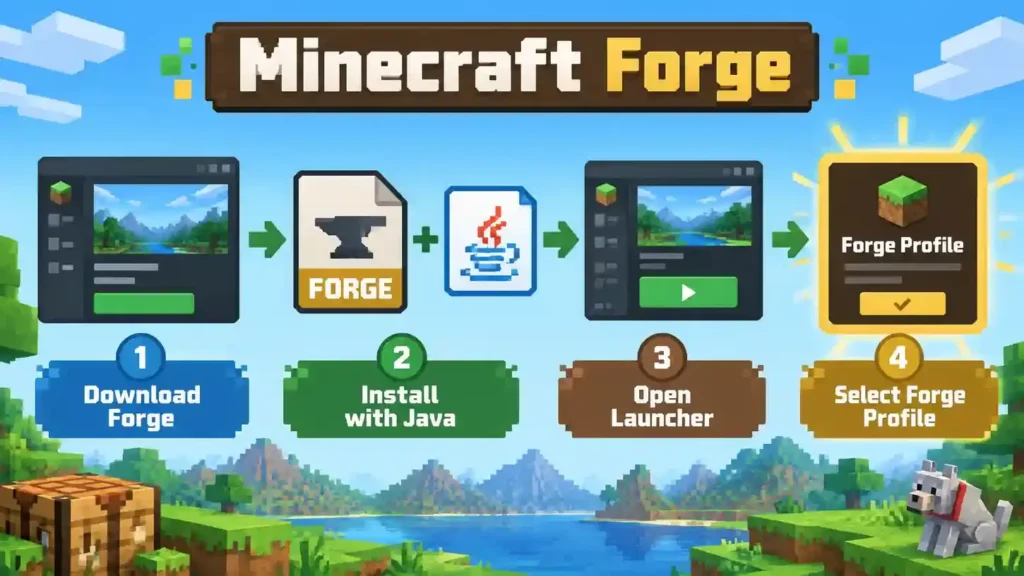
Step 3 — Run the Forge installer
Open the downloaded Forge installer. Select Install client when the installer appears. The installer normally detects your Minecraft directory automatically. Check the directory before continuing. Click OK to start the installation. Wait until Forge confirms that the installation finished successfully.
Step 4 — Open Minecraft Launcher
Open the official Minecraft Launcher after installation finishes. The launcher should detect the new Forge installation automatically.
Step 5 — Select the Forge profile
Open the Minecraft Java Edition installations or profiles section. Select the Forge profile that matches your chosen Minecraft version. Check the version before starting the game.
Step 6 — Launch Minecraft
Click Play to start Minecraft with Forge. The first launch may take longer while Forge prepares required files. Let the process finish before closing the launcher.
Step 7 — Check that Forge installed correctly
Open Minecraft and check the main menu for Forge information. You can also check the Mods button or menu. Forge should display its installed version and loaded mod information. If Forge appears correctly, the installation succeeded. You can now install compatible Forge mods.
How to Install Minecraft Forge Mods
Find a compatible Forge mod
Start by finding a mod that supports Minecraft Forge. Check the mod page before downloading anything. Look for the supported Minecraft version and mod loader. Trusted platforms such as CurseForge and Modrinth provide version information for many mods.
Download the correct mod version
Choose a mod that matches your Minecraft version. Then confirm that it supports your Forge version or loader. Also check the mod’s dependencies. Some Forge mods need additional libraries or other mods to work correctly. A missing dependency can prevent Minecraft from starting. It can also cause a mod loading error.
Find the Minecraft mods folder
Open your Minecraft game directory. Then find the folder named mods. On Windows, the default Minecraft directory usually uses:
%appdata%\.minecraft
If the mods folder does not exist, create a new folder with that exact name.
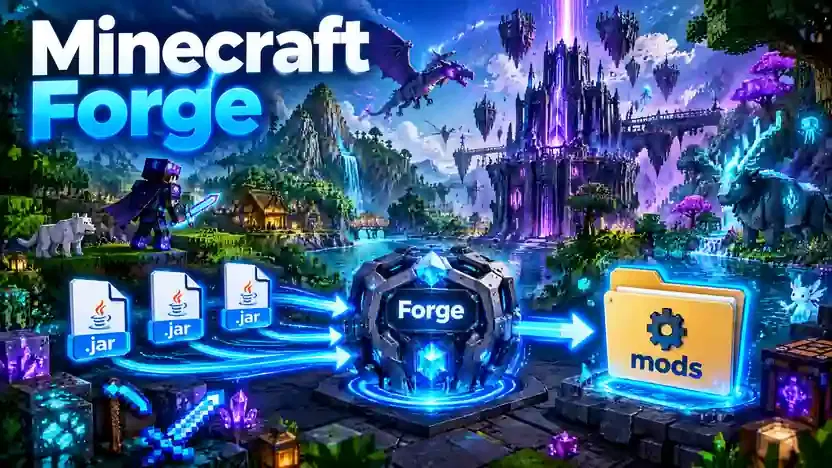
Put the mod .jar file into the mods folder
Move the downloaded mod .jar file into the mods folder. Do not extract the .jar file unless the mod developer specifically instructs you to do so.
Launch Minecraft with Forge
Open the Minecraft Launcher and select your Forge installation. Then click Play. Make sure you use the same Minecraft version that supports your downloaded mod.
Check the Mods menu
After Minecraft starts, open the Mods menu. Look for the mod’s name in the installed mod list. If the mod appears there, Forge has loaded it successfully. If it does not appear, recheck the Minecraft version, Forge version, file location, and required dependencies.
Minecraft Forge Mods and Modpacks
What are Forge mods?
Forge mods are modifications designed to work with the Minecraft Forge modding platform. They can add new items, blocks, creatures, mechanics, dimensions, and other features. Each mod lists the Minecraft versions and loaders it supports.
What are Forge modpacks?
A Forge modpack combines multiple compatible mods into one Minecraft setup. Modpacks can create complete gameplay experiences around specific themes or goals. The pack usually includes its required mods and configuration files.
What are mod dependencies?
A dependency is another mod or library that a mod needs to function. The mod’s page usually lists these requirements. You must install compatible dependencies before launching the modpack or game.
Can you use Fabric mods with Forge?
Generally, no. Forge and Fabric use different modding systems and loaders. A Fabric mod usually requires Fabric Loader and cannot load through Forge. Always check the mod page for its supported loader before downloading it.
Where can you find Forge mods?
You can find Forge mods on established platforms such as CurseForge and Modrinth. Check the loader, Minecraft version, and dependencies before downloading. Avoid random download sites. Trusted sources can reduce compatibility and security risks.
Minecraft Forge Server Setup
A Minecraft Forge server lets players use compatible Forge mods in multiplayer. You can run it on your computer or a dedicated server. First, download the Forge server installer for your Minecraft version. Select the server installation option and let Forge create the required server files. The server setup includes files, libraries, configuration folders, and a mods folder. Place compatible server-side mods inside that folder.
Your clients and server should use matching Minecraft and Forge versions. They may also need the same required mods and dependencies. Java requirements depend on your Minecraft and Forge versions. Check the requirements for your specific version before starting the server. A dedicated server runs continuously on a separate machine. A modpack server uses a coordinated collection of compatible mods. For detailed instructions, see our Complete Minecraft Forge Server Setup Guide.
Minecraft Forge Not Working? Common Problems and Fixes
Forge problems often come from version mismatches, Java issues, or incompatible mods. Start by checking your Minecraft and Forge versions.
Forge installer does not open
First, check your Java version. Your Minecraft version may require a specific Java release. Also confirm that you downloaded the correct Forge installer. A wrong file association can also prevent .jar files from opening.
Minecraft Forge crashes on startup
Check your Minecraft version and Forge version first. Then check every installed mod for compatibility. Remove recently added mods if the crash started after an installation. Also check required dependencies and your Java version. Forge support recommends checking logs when diagnosing crashes.
Forge mods are not showing
Check the mods folder location first. Then confirm that you launched the correct Forge profile. Next, check the mod’s Minecraft version and Forge compatibility. Also verify the required file format and dependencies.
Incompatible mod set error
This error usually indicates a compatibility problem. A mod may require another version or a missing dependency. Check the error message for the affected mod. Then install the required version or dependency.
Forge server crashes
Check the server and client Minecraft versions. Then verify the Forge version and installed mods. Make sure required dependencies exist on the server. Check the server logs for the exact error.
Where are Forge crash logs?
On Windows, Forge support points users to the .minecraft\logs folder for debug.log. Installer problems can also produce an installer log. For serious crashes, keep the complete log or crash report. It can reveal the mod, dependency, or Java issue causing the failure.
Minecraft Forge vs Fabric vs NeoForge
Minecraft Forge, Fabric, and NeoForge are separate mod-loading platforms. Each has its own mod ecosystem and compatibility rules.
| Feature | Forge | Fabric | NeoForge |
| Mod ecosystem | Forge ecosystem | Fabric ecosystem | NeoForge ecosystem |
| Mod compatibility | Forge mods | Fabric mods | NeoForge mods |
| Loader | Forge | Fabric Loader | NeoForge |
| Modpacks | Yes | Yes | Yes |
| Cross-loader compatibility | Limited | Limited | Limited |
Forge
Forge supports mods built for its modding platform. It remains widely used across many Minecraft versions and modpacks.
Fabric
Fabric uses Fabric Loader and its own modding ecosystem. Its official documentation describes Fabric Loader as a lightweight mod loader.
NeoForge
NeoForge provides another Minecraft modding platform. Its official documentation provides separate installation and mod development guides.
Which loader should you use?
Choose the loader that your required mod supports.
- If your mod requires Forge, use Forge.
- If your mod requires Fabric, use Fabric.
- If your mod requires NeoForge, use NeoForge.
Always check the mod page before downloading it. Confirm the Minecraft version and loader together. A Forge mod does not automatically work with Fabric or NeoForge. Loader-specific metadata and dependencies can affect compatibility.
Minecraft Forge for Mod Developers
Minecraft Forge also provides tools for developers who want to create mods. The Forge MDK provides the starting files for a Forge mod project.Forge development uses Java and Gradle. ForgeGradle helps configure and build Minecraft mod projects. Developers also work with Minecraft mappings to reference game code during development. A Forge mod uses metadata to define important mod information. The mods.toml file stores metadata such as the mod ID and dependencies.
Forge provides systems that developers can use to build complex mods. These include the event system, registries, and networking tools. Developers can use events to respond to game actions. Registries help mods add items, blocks, and other game objects. For a deeper technical walkthrough, see our Minecraft Forge Mod Development Guide.
Frequently Asked Questions About Minecraft Forge
Is Minecraft Forge free?
Yes. Minecraft Forge is free and open-source software for modding Minecraft Java Edition.
Is Minecraft Forge safe?
Forge itself is widely used for Minecraft modding. Download it from the official Forge website to avoid fake installers.
Is Minecraft Forge a mod?
No. Forge is a modding framework and mod loader. It allows compatible mods to run inside Minecraft.
Does Forge work with Minecraft Java Edition?
Yes. Forge is designed for Minecraft Java Edition. Always match Forge with your Minecraft version.
Can I use Forge mods without Forge?
Usually, no. Forge mods depend on Forge’s loader and systems to function correctly.
Can Forge and Fabric mods work together?
Generally, no. Forge and Fabric use different mod loaders and mod APIs. Check specific compatibility tools carefully.
Is Forge better than Fabric?
Neither is universally better. Choose the loader required by the mods or modpack you want to use.
Is NeoForge the same as Forge?
No. NeoForge is a separate Minecraft modding platform with its own loader, APIs, and mod ecosystem.
Why does Minecraft Forge keep crashing?
Common causes include incompatible mods, missing dependencies, incorrect versions, or unsuitable Java versions. Check the crash report and logs.
How do I uninstall Minecraft Forge?
Remove the Forge installation or profile through the Minecraft Launcher. Back up your worlds before changing installations.
Final Verdict
Minecraft Forge is a powerful modding framework for Minecraft Java Edition. It helps players run compatible mods and modpacks with greater customization. Version compatibility matters because Forge, Minecraft, and mods must match correctly. Download the correct Forge installer from a trustworthy source, then install the matching version. Add compatible mod files to the correct mods folder. If problems occur, check versions, dependencies, Java, logs, and crash reports. Always use official or trusted sources for downloads. For more help, explore our guides on Minecraft Forge Mods, Forge Installation, Forge Servers, and Forge Troubleshooting.